Mystical Wonders Discussion Group Forum Index Mystical Wonders Discussion Group
This is the #1 group in the world that encompasses so many various fields at one forum with so many discussions and so many members growing all the time!. This is the ORIGINAL Mystical Wonders group that previously resided on Yahoo.
 
  FAQFAQ    ProfileRefer A Friend    SearchSearch    UsergroupsUsergroups   RegisterRegister 
  SubscriptionSubscription   TransactionsTransactions   ProfileProfile    Log in to check your private messagesLog in to check your private messages    Log inLog in 
 Please help us to develop!
pic
pic
pic
pic

Cybershaman Question - Where should I put my own image?

Bookmark and Share

 
Post new topic   Reply to topic    Mystical Wonders Discussion Group Forum Index -> Radionics - Psionics - Psychotronics
Author Message
jackle08


Joined: 10 Oct 2009
Posts: 4

PostPosted: Sun Dec 27, 2009 3:17 am    Post subject: Cybershaman Question - Where should I put my own image? Reply with quote

I am using the "attract opposite sex" preset, and seemingly using my own photo will help. But where should I put it?
Is it the "symbol energizing target" field?

Thanks~
Back to top
 “Discover How to Skyrocket Your Business, And Outsmart Your Competition - Without Hitting Your Head Against the Wall”
bryanskrantz


Joined: 11 Sep 2007
Posts: 188
Location: New Jersey

PostPosted: Sat Feb 20, 2010 1:50 am    Post subject: Reply with quote

you put your image in the lower left box called the subject box. the target picture should go in the lower right box.
Back to top
 “Discover How to Skyrocket Your Business, And Outsmart Your Competition - Without Hitting Your Head Against the Wall”
CountryBear


Joined: 27 Apr 2008
Posts: 59

PostPosted: Sat Mar 13, 2010 7:15 pm    Post subject: Reply with quote

I can never get a picture into the lower boxes, just text. Any ideas on how to make that work?
Back to top
anarchiste


Joined: 24 Jul 2010
Posts: 2

PostPosted: Sat Jul 24, 2010 4:13 pm    Post subject: Reply with quote

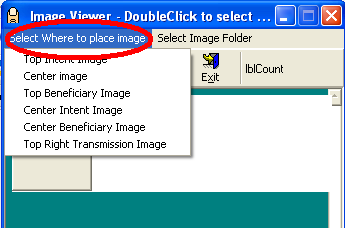
From what I've discovered in CS7 you can click on one of the top pictures which will bring up a dialog box.

You will see a toolbar and just above it you should see two text options - one for placement of the image and the other what preset library of images you want to select from.

The ones that you want will be Centre Trend and Centre Benficiary - and you have to click on the menu item FIRST then double click on the image you want to add otherwise it will put the image in the last selected location namely the box you originally clicked on.

I have added an image of what to look for.

Hope this makes sense.


csthumbnails.PNG
 Description:
image showing image placement in cs7
 Filesize:  12.79 KB
 Viewed:  1360 Time(s)

csthumbnails.PNG


Back to top

Are You Ready To Gigantically Raise Your Manifestation Powers
And Receive All That You Want? ‏

Display posts from previous:   
Post new topic   Reply to topic    Mystical Wonders Discussion Group Forum Index -> Radionics - Psionics - Psychotronics All times are GMT
Page 1 of 1
Register Now


All images & text ©Copyright 2003 mysticalwonders.org
Mystical Wonders™ is an established trademark since June, 2003.
Produced & Maintained by Mystical Wonders Internet Consulting